
Paid
Verdalen Produce Co.
Inv #B-90210 • Food Cost
- Due date
- Bill total
- $1,840.00
- Status
- Paid in full. Nothing outstanding on this bill.
Browse by
Take Orders
6 featuresSee Vertex POS in Action
Explore how Vertex manages ordering, inventory, kitchen, payments and customer engagement all in one platform.
Book DemoGrow your business by reselling or integrating with Vertex. Partner with us
Browse by
Fine Dining
4 featuresFind Your Perfect Fit
Whether you run one outlet or five hundred, Vertex adapts to your service model.
Talk to an ExpertBrowse by
Learning
4 features2025 Restaurant Tech Guide
Download our definitive 40-page guide to choosing, implementing and scaling restaurant technology.
Download FreeBrowse by
Company
4 featuresBecome a Vertex Partner
Grow your business by reselling or integrating with Vertex.
Apply NowLearn More
Bring ledgers, bills, reconciliation, budgets and tax reporting into one controlled financial workspace, ready for your accountant to review.
+12.5% versus the previous period
Total Revenue
$142,500.00
−2.4% versus the previous period
COGS (Food & Bev)
$48,230.50
+8.1% versus the previous period
Net Operating Profit
$34,120.00
Unreconciled Trans
12
Outstanding Bills
$8,450.00
Due todayOp Expenses
$60,149.50
within budgetSample figures shown for illustration. Chart of accounts, tax codes and reporting periods are configured by you and your accountant.
Follow the money from the kitchen floor to the boardroom. Vertex gives you a configurable account hierarchy that mirrors restaurant operations.
Account codes, names and hierarchy are configurable. You and your accountant decide the final chart of accounts and how it maps to your reporting obligations.
| Date | Account / description | Debit | Credit |
|---|---|---|---|
| Oct 12 | 1100 - Main Operating Bank | 4,500.00 | 0.00 |
| Oct 12 | 4100 - Daily Dining Sales | 0.00 | 4,500.00 |
| Oct 14 | 5100 - Food Purchases (COGS) | 1,240.50 | 0.00 |
| Oct 14 | 2100 - Accounts Payable | 0.00 | 1,240.50 |
| Total | 5,740.50 | 5,740.50 |
Sample figures shown for illustration.
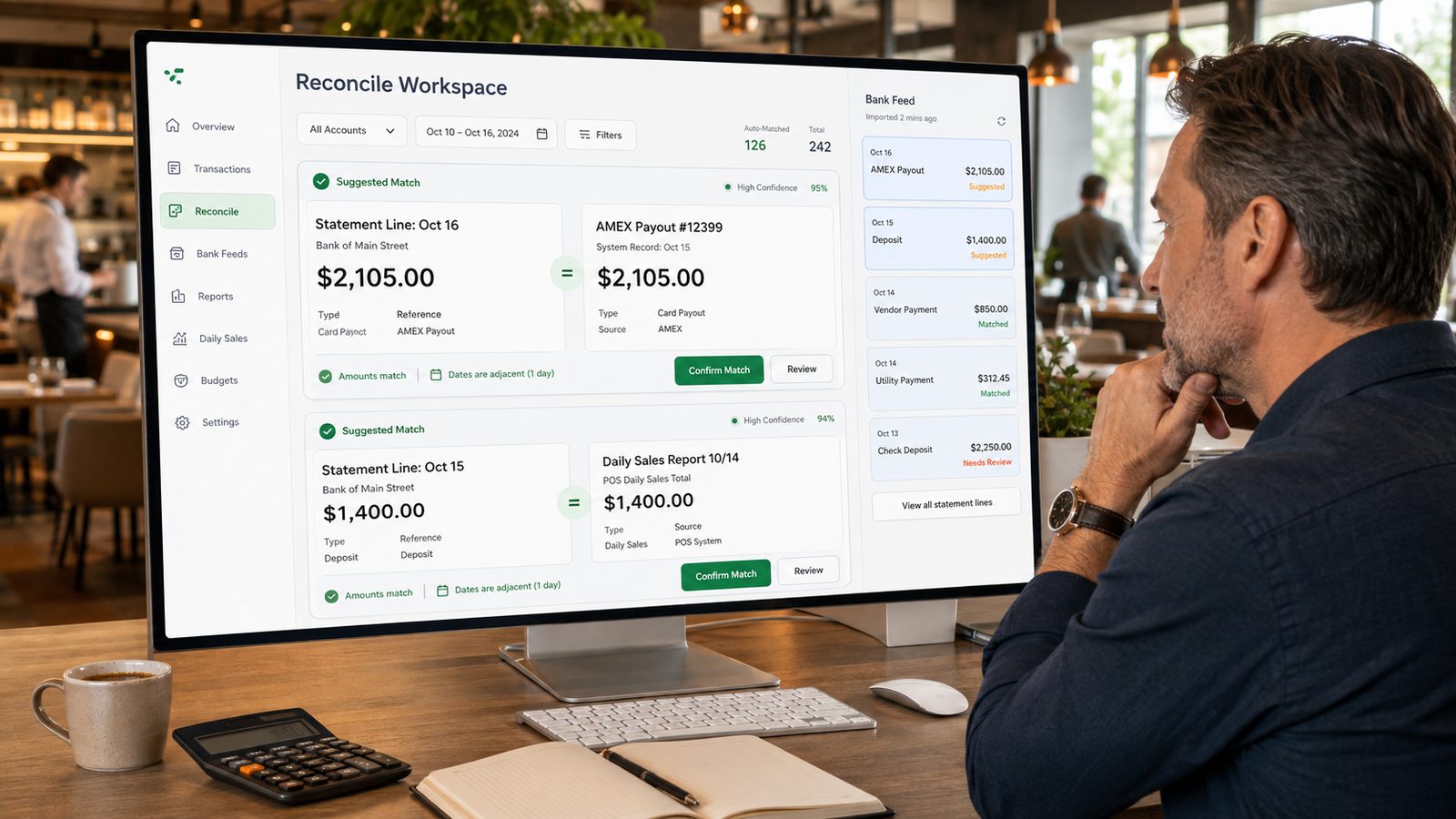
Effortless bank feed integration. Automatically suggest matches between bank statement lines and internal POS records or bills.
“Oct 15 – Deposit $1,400” matches “Daily Sales Report 10/14”
Sample figures shown for illustration. Matches are suggestions for you and your accountant to review and confirm.
Inv #B-90210 • Food Cost
Inv #DEL-009 • Freight & Delivery
Inv #W-5552 • Beverage Cost
Sample figures shown for illustration. Vendor names are fictional. Expense accounts, approval routes and payment terms are configured by you and your accountant.
Budgeting that flexes with your season. Set targets for food cost %, labor and overheads, then review variance against them as actuals post to the ledger.
Kitchen labor is at 92% of its October budget, $2,000 under the target set for the period.
Monthly variance analysis
October
| Account | Actual | Budget | Var % |
|---|---|---|---|
| Food Sales | 98,400 | 92,000 | +7.0%Favorable |
| COGS - Food | 29,520 | 27,600 | +7.0%Unfavorable |
| Kitchen Labor | 24,000 | 26,000 | −7.7%Favorable |
| Rent & Utilities | 12,000 | 12,000 | 0.0%On budget |
Sample figures shown for illustration. Budgets, accounts, reporting periods and currency are configured by you, and reviewing the resulting figures remains your and your accountant’s responsibility.
Fiscal year to date
| Line item | Amount |
|---|---|
| Net Sales | $142,500.00 |
| Total Cost of Goods Sold | − $48,230.50 |
| Gross Profit | $94,269.50 |
| Total Operating Expenses | − $60,149.50 |
| Net Income | $34,120.00 |
Balanced — total debits equal total credits
| Account group | Debit | Credit |
|---|---|---|
| 1100 Operating Cash | 54,200 | 0 |
| 2100 Accounts Payable | 0 | 8,450 |
| 3100 Equity | 0 | 45,750 |
| Total | 54,200 | 54,200 |
Sample figures shown for illustration. Statements are generated from your own transaction data for you and your accountant to review. Chart of accounts, tax codes and reporting periods are configured by you.
Whether you’re working with GST, VAT or local state taxes, Vertex applies the multi-rate mappings you set up across your revenue and expense categories. You and your accountant decide which rates apply and where.
Prices can be entered tax inclusive or tax exclusive; the mode is part of the setup you choose.
| Tax rate | Sample rate |
|---|---|
| Standard GSTDefault for sales and expenses | 10.0% |
| Tax ExemptMapped to wages and government fees | 0.0% |
| Reduced Rate (Liquor)Regional excise category | 5.0% |
Sample configuration shown for illustration. The rates above are examples, not tax advice, and are not a statement of any rate in force. Rate names, percentages and category mappings are set up by you and your accountant or tax adviser; Vertex applies the rules you configure and does not determine the correct treatment for your jurisdiction or maintain rates on your behalf.
A general ledger built on a chart of accounts you structure yourself, vendor bills with due dates and account coding, bank reconciliation against your recorded transactions, budgets with variance reporting, period statements such as a profit and loss summary and a trial balance, and configurable tax rates mapped across revenue and expense categories. The point of it is that daily sales, purchases and payroll land in one ledger rather than being re-keyed into a spreadsheet at month end. Two things worth setting out at the start. The figures on this page — the revenue, COGS and profit totals, the supplier names, the variance percentages, the tax rates — are sample data used to show the shape of the screens, not a projection of your results or a recommendation. And Vertex is a book-keeping and reporting tool: it records and reports what your team enters and what your POS captures. It is not an accountant, an auditor or a tax adviser, and the answers below are fairly specific about where that line falls.
You define the hierarchy yourself — assets, liabilities, revenue and expenses, with sub-accounts underneath such as bank accounts sitting under assets — using a numbering scheme that matches how you actually run the business, so food, beverage, labour and overhead can be traced separately instead of collapsing into a single line called costs. Postings are double entry: every journal line carries a date, an account, a description and a debit or credit amount, and you can read a figure in a report back to the transaction it came from. What decides whether an amount lands in the right place is the mapping you configure — which POS revenue category posts to which account, which expense code a supplier bill takes. Vertex applies that mapping consistently. Deciding what the correct mapping is in the first place, and revisiting it when you add a revenue stream or open a site, is a judgement for you and your accountant.
Where a bank feed is available for your bank, statement lines are imported and matched against transactions already recorded in Vertex: a card payout against the settlement record, a deposit against the daily sales report, a payment against a vendor bill. Vertex proposes matches with a confidence indicator and shows why it paired them, so lines whose amounts and dates agree are grouped for you rather than hunted through a PDF statement. The word to be careful with is reconciles. Vertex suggests; a person confirms. Each proposed match sits behind a confirm or review step, and anything it cannot pair is left in an open queue for someone to work through. That queue is the honest part of the screen — unreconciled items usually mean something was recorded late, recorded twice, or not recorded at all, and no matching engine can tell you which of those it is. Reconciliation is a control your business performs; Vertex arranges the evidence for it and keeps a record of who confirmed what. Bank feed availability depends on your bank and your region, so please confirm yours with our sales team rather than assuming it.
Bills are captured against the supplier with an invoice reference, a due date, an amount and an expense account, and each one carries a status — paid, pending approval or overdue — so what is owed and what has slipped is visible without opening a folder. Approval routing is configurable, and as with reconciliation the approval is a human act that Vertex records rather than performs: it does not judge whether a price is reasonable or an invoice genuine, it makes sure the bill cannot pass the approval step without someone accountable putting their name to it. Budgets work alongside that. You set targets by account — food cost percentage, labour, rent and utilities — and Vertex reports actual against budget with the variance for the period. Treat a variance as a prompt to go and look rather than a verdict: an overspend against food cost might be a supplier price rise, a portioning problem, a mis-coded invoice or a budget that was set optimistically, and the report will not distinguish between them for you.
Vertex applies the tax rules you configure. You set up the rates and codes your business uses — GST, VAT, local sales or excise taxes — map them to revenue and expense categories, mark categories that are not taxed, and choose whether prices are handled tax-inclusive or tax-exclusive. The ledger then applies that configuration consistently and produces reports from it. What it does not do is make you tax compliant, and any tool that claims to should be treated with suspicion. Vertex does not decide which rate applies to a menu item, whether a supply is exempt, how a mixed inclusive and exclusive pricing model ought to be treated, or what a return has to contain. You will not find a rate, a threshold, a filing date, a retention period or a required invoice format stated anywhere on this page, because all of those are jurisdiction-dependent and change over time — they are configuration, not product defaults. Nor does Vertex monitor rate changes on your behalf: if a rate you use moves, you update it. Determining the correct treatment, keeping the configuration current and filing what is due remains yours to settle with your accountant or tax adviser.
You can produce a profit and loss summary and a trial balance for a selected period, export them and give them to your accountant — that is what the reporting is designed for. Be careful about what those outputs prove. A trial balance marked balanced means the debits equal the credits; it is an arithmetic check, not evidence that transactions were classified correctly, that the period cut-off was right, or that everything which happened was recorded. Cash taken and not entered, an invoice coded to the wrong account, or stock counted loosely will produce statements that balance perfectly and still misstate the business. So the answer to both halves of the question is no. Running Vertex does not make your books ready for an audit, and it is not a replacement for your accountant. What it gives an accountant or auditor is a traceable ledger to work from — journals back to source transactions, bills back to suppliers, reconciliations back to the person who confirmed them — which is the difference between reconstructing your year and reviewing it. Preparing statutory accounts, forming a view on the correct treatment and signing them off is professional work, and it stays with the professional you appoint.

See how Vertex brings your sales, purchases and payments into a single ledger, keeps bills and reconciliation in one view, and exports the summaries your accountant asks for — built from the numbers your own team records.