
Auto-suggest combos to boost per-ticket revenue.
Offer combo upgrades, add-ons and cross-sell prompts from rules you configure, surfaced at the right moment during ordering.
Built for Seamless Upselling
Your rule engine applies your combo and upsell logic consistently across every ordering channel.
Recommendation Rules Engine
Define which items get offered together. Rules you author read the basket and surface the right meal upgrade or “frequently bought together” prompt at checkout.
- Reads what is already in the basket
- Matches your saved combo & attach rules
- Surfaces the prompt at the terminal
Visual Combo Builder
- TRIGGER: Item added = ‘Burger’
- CHECK: Not already in ‘Meal Deal’
- ACTION: Suggest combo upgrade
True Multi-Channel Support
Deploy rules once, see them everywhere. Consistent upselling logic across Kiosks, POS, Mobile Apps, and Online Ordering without redundant setup.
- POS
- Kiosk
- Mobile
- QR Order
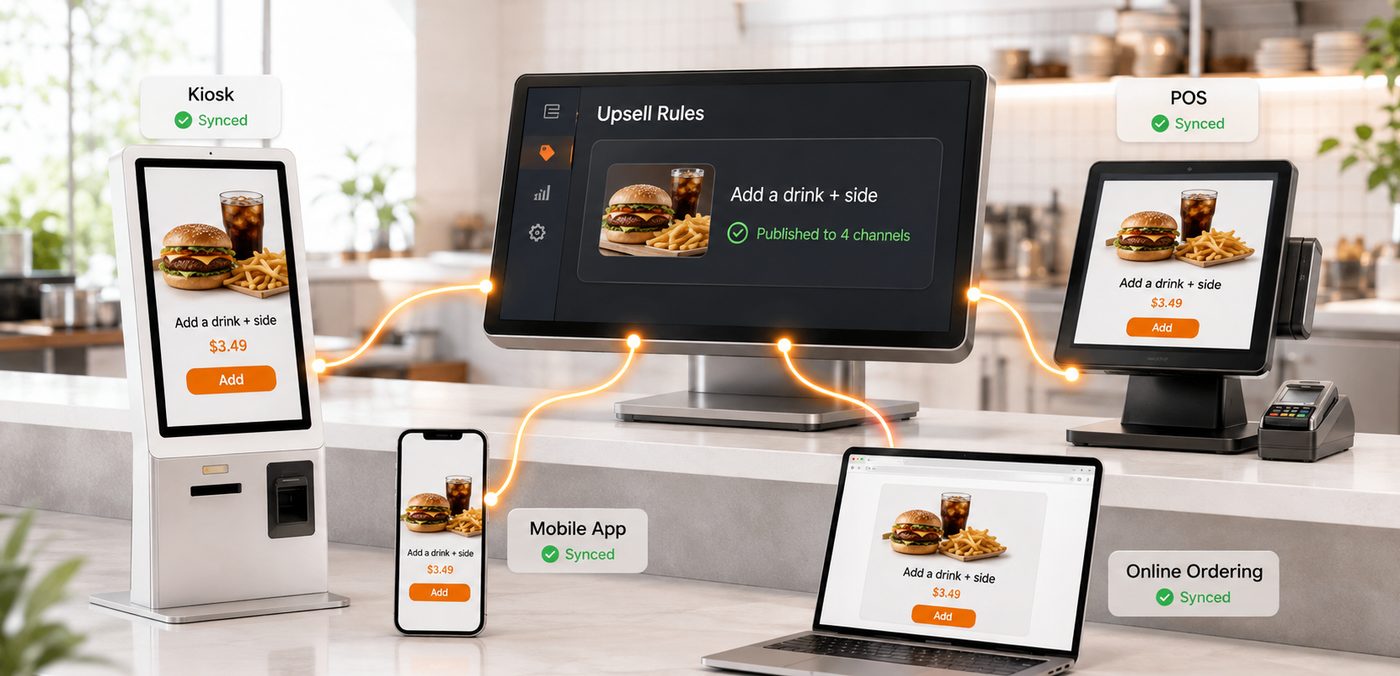
Sample rules and figures shown for illustration.
Track Your Revenue Growth
Real-time dashboards provide granular insights into how combos and upsells are impacting your bottom line.
Average order value increase
Upsell conversion rate
Revenue from upsells (today)
Sample figures shown for illustration.
Frequently Asked Questions
They let you write the rules that decide when a suggestion appears and what it offers, and then apply those rules on the ordering screens you already run. This page shows the shape of it: a visual builder where a rule reads as a trigger, a check and an action — the sample on the page is "when a burger is added", "if it is not already part of a meal deal", "suggest a combo upgrade" — and once you save that rule it can appear at the point of order across your channels. So you might define a meal deal that bundles a main with a drink and a side at a set price, a cross-sell prompt that offers a dessert when a coffee is added, or an "add a drink and side" prompt like the $3.49 one drawn in the mock. Two framings sit under everything below. The first is that you are the author: Vertex does not know your menu, your margins or your guests, so it does not decide what to combine or what to charge — you write the combo, the price and the condition, and the software carries out the rule you wrote. The second is that every figure printed on this page is sample data. The $+4.20 average-order-value tile, the 24% conversion rate, the $1,540 of upsell revenue, the +14% and +8% arrows, and the 28% / 94% / 0.1s numbers in the bento all exist to make a demo screen look populated. None of them was measured at a real site, none is a projection of your results, and none is a target being promised to you. Please do not build a business case on a number that is there to fill a mock dashboard.
We are not going to promise that, and any page that does is selling you something software cannot deliver. What a customer adds to their order is decided by your menu, your prices, how the prompt is worded and timed, how your staff use it, and whether the guest actually wants the thing being offered — none of which is Vertex's to control. The tiles on this page that read "Average Order Value Increase $+4.20", "Upsell Conversion Rate 24%" and "Revenue From Upsells $1,540" are sample figures on a mock dashboard, not outcomes you should expect and not a baseline drawn from your business. What the software can honestly do is narrower and still useful: it applies the prompt you configured consistently at the moment you chose, on the channels you chose, and it records what happened afterwards so you can look at it. Whether a given combo actually lifts a basket, and by how much, is something you find out by running it and reading your own numbers over enough weeks to see your own seasonality — not by trusting a figure drawn in a design file. A prompt that offers a pairing your guests do not want will convert at close to nothing however cleanly it is presented, and that is a menu and pricing question you own, not a setting you can turn up.
Those are the design's words, quoted here rather than restated, and it is worth being precise about what this page actually shows so you do not over-read them. What the page shows is a rule builder: you set a trigger, a check and an action, and the recommendation that appears is the one your rule produces. Where "predictive" comes in is that a suggestion can be informed by what is already in the basket — the design describes analysing basket content to offer "frequently bought together" items — but that is pattern-based prompting inside the conditions you set, not an autonomous system that decides your menu strategy for you. It does not have taste, it does not know your margins, and it will not invent a combo you did not author. So treat it as a helper that surfaces a suggestion under your rules, and keep the judgement where it belongs — with you. If it matters to you exactly how the "frequently bought together" suggestions are generated, whether you can constrain or override them, and how much of it is fixed rules versus anything learned from data, put those questions to our sales team in writing and ask to see it running on your own menu before you rely on it. You will not find an accuracy claim in this answer — the "94% accuracy" and "0.1s latency" figures in the bento are sample data on a mock, not a measured specification, and it would be worse to repeat them as if they were.
This page's "True Multi-Channel Support" describes deploying a rule once and having it appear across your ordering surfaces rather than rebuilding it separately for each — the design names POS, Kiosk, Mobile and Online Ordering, shows a QR Order chip alongside them, and marks a sample prompt as "Published to 4 channels". The intent is that the combo or cross-sell you author is the same on the till, the self-order kiosk, the phone and the web, so a guest sees consistent offers and your team is not maintaining four copies of the same rule. Two honest caveats. First, which of your channels are actually connected depends on what you have deployed and integrated — a rule can only appear on a surface Vertex is driving, so if your online ordering or kiosks run on something the page does not describe, confirm the fit with sales rather than assuming it. Second, the same offer can land very differently on a staffed till than on an unattended kiosk: on the POS a person can read the room and skip a prompt, whereas on a kiosk the prompt is the whole interaction, so it is worth tuning what shows where rather than publishing everything everywhere by default. The channel list, and exactly what "published to 4 channels" covers for your setup, are worth confirming with our team for your own estate.
By treating restraint as part of the configuration, because more prompts is not more revenue. An upsell has a consumer-facing edge that this page's cheerful framing tends to gloss over: a prompt that fires too often, at the wrong moment, or for something the guest plainly does not want reads as nagging, and on a busy counter or drive-through it costs you time on every order whether or not anyone accepts it. That is a real trade-off, and it is yours to manage. The builder is where you manage it — the check step exists precisely so a suggestion does not fire when it should not, and the sample rule on the page uses one ("not already in a meal deal") to avoid offering a combo to someone who has already taken one. So set conditions that suppress the obvious annoyances, keep the number of prompts per order low and relevant, and lean on the kind of pairing a guest would plausibly want rather than whatever has the highest ticket value. It is also worth watching the human cost on staffed channels: a prompt your team learns to dismiss reflexively adds friction without adding sales, which is a training and design question as much as a settings one. None of this is something the software decides for you; it gives you the conditions, and you decide how gentle to be.
Yes, a combo can bundle items at a price lower than buying them separately — that is often the whole point of a meal deal, since the discount is what makes the bundle attractive — but that discount is a margin decision, and it is entirely yours. Vertex will apply whatever price you set on the combo; it has no view on whether that price is sensible for your food cost, and it will not warn you that you have priced a bundle below what it costs you to make. So the arithmetic sits with you: work out what each combo does to your margin at the volume you expect, not just to the headline order value, because a bundle that sells well at a price that loses you money is worse than no bundle at all. The same goes for a cross-sell that discounts an add-on to encourage attachment — the prompt is trivial to configure, but the economics behind it are a decision you own and should check against your own costs before you publish it. If you want to model that against real numbers, that is a conversation worth having with our team, but the price on the combo is always the one you chose.

Ready to build combos and upsell rules on one system?
Tell us how your menu really works — what you would bundle, where you want a prompt to appear, and which of your channels are in play — and we will walk you through how Vertex would let you author a combo or cross-sell rule once and apply it across your ordering surfaces, what stays a decision for you and your team, and what any number is worth before you rely on it.