Vertex POS
Barcode

Barcode & label printing.

Generate barcodes, scan receiving and stock activity, and print clear labels through a connected inventory workflow — so fewer counts depend on someone typing a code correctly.

  • Generate barcodes
  • Scan receiving
  • Scan stock
  • Print labels

Operations Dashboard

Real-time throughput for scanning stations.

Assigned Barcodes

12,408

+2.4%

Scans Today

842

Unknown Scans

3

Action Needed

Labels Printed

315

Queue: 4

Sample figures shown for illustration.

Efficiency

Barcode Generation & Mapping

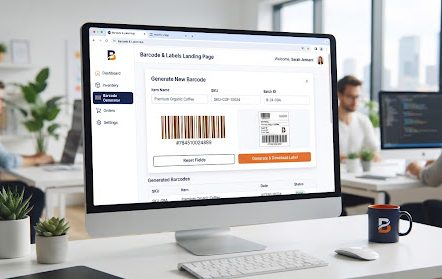
Generate unique internal identifiers or map existing supplier GS1 barcodes directly to your inventory items. Support for EAN, QR, and custom alphanumeric strings.

  • Auto-generate batch-specific labels.
  • Import vendor mapping spreadsheets.

A desktop monitor in a bright open-plan office showing a barcode generator screen, where an item name, SKU and batch ID are filled in, a barcode preview is rendered, and a label is ready to download.
Real-time

Item Lookup & Scan Experience

Low-latency scanning interface designed for handheld devices and dedicated workstations. Get immediate visual and haptic feedback for every successful scan.

Explore Scanning Tech

Scan Success

Whole Milk 1L (12 units) added to inventory.

Batch:
#220914-A
Expiry:
Oct 24, 2024
Customization

Label Template Builder

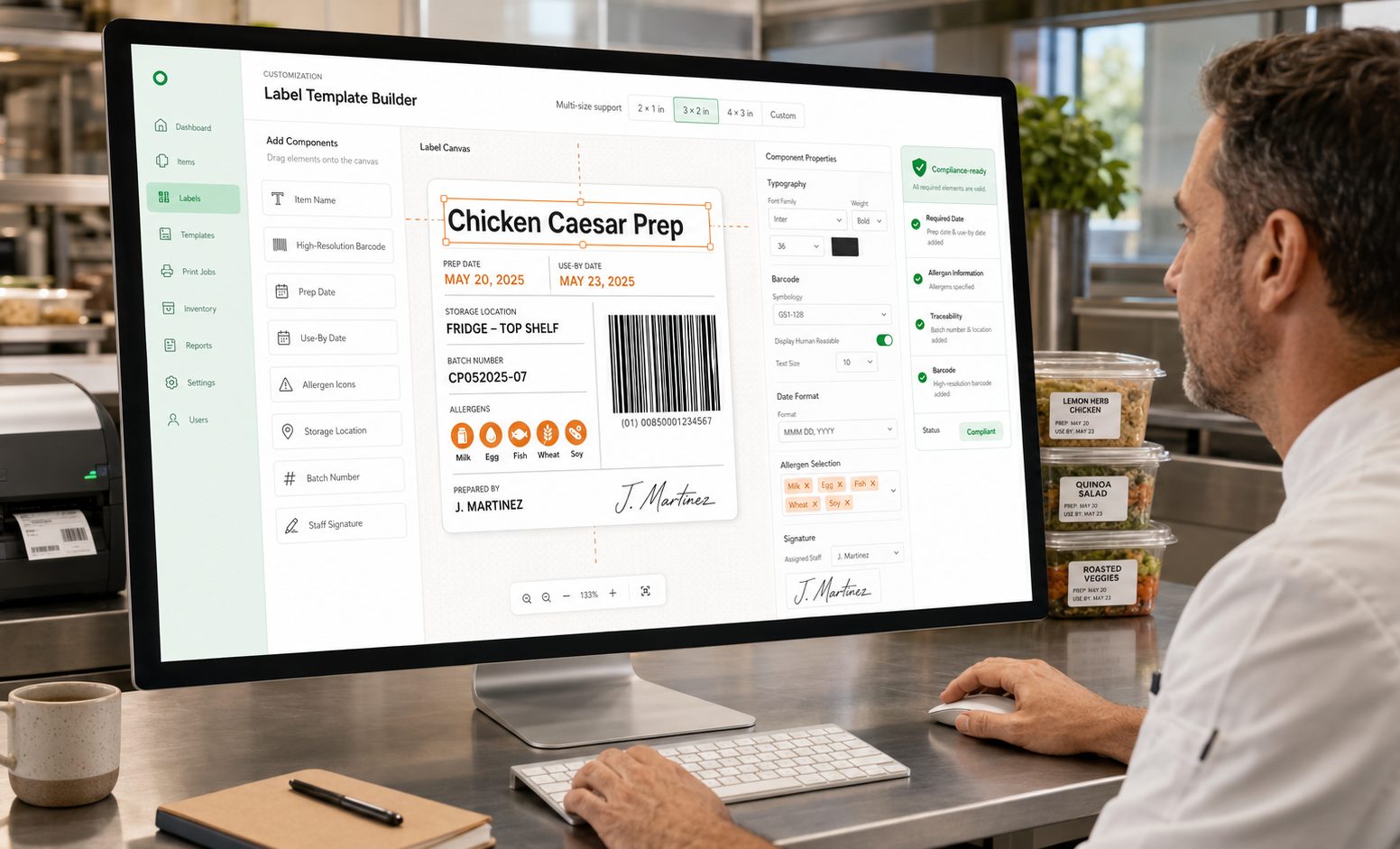
Drag-and-drop elements to create labels that fit your containers. Include high-resolution barcodes, prep dates, allergen icons, and staff signatures automatically.

  • Multi-size support
  • Compliance-ready
A chef at a stainless-steel kitchen bench works in the label template builder on a desktop monitor, dragging item name, prep date, use-by date, storage location, batch number, allergen icons and a staff signature onto a food label, with printed labels on prepped containers beside him.

Scan Logs & Traceability

Audit trail of barcode activity across your entire organization.

Sample barcode scan log, newest scan first, showing the time of each scan, the role and handheld device that raised it, the action taken, the item the barcode resolved to and the outcome. Illustrative data.
TimeUser / deviceActionItemStatus
10:45 AMReceiving Clerk (Scanner 01)Receiving ScanWhole Milk 1LSuccess
10:42 AMStore Keeper (Handheld 04)Stock MoveAvocados (5kg)Success
10:38 AMReceiving Clerk (Scanner 01)Label PrintedAged CheddarSuccess

Sample log entries shown for illustration.

Connected Inventory Workflow

Barcode scanning isn’t an island. It’s the heartbeat of your inventory. Every scan updates stock levels, recalculates COGS, and triggers automated reordering.

Frequently Asked Questions

Four things, joined up: generating barcodes against your items, scanning goods in at receiving, scanning stock as it moves, and printing labels for what you produce or repack. Above that sits an operations view showing how many barcodes are assigned, how many scans have been logged today, how many of those scans came back unknown, and how many labels have been printed with what is still queued. The figures shown on this page are sample data used to illustrate the shape of the screen — they are not a projection of what your sites will record.

Either. Vertex can generate unique internal identifiers for items that do not carry a code, and it can map an existing supplier barcode straight onto the matching inventory item, including through an imported vendor mapping spreadsheet rather than item-by-item. The generator handles EAN, QR and custom alphanumeric strings, and labels can be produced per batch. One thing worth being clear about: Vertex stores and prints whatever code you assign, and that is the whole of its role in the numbering. If you need genuine retail identifiers — GTINs or UPCs for products you sell on beyond your own four walls — you obtain those from GS1 yourself, under your own company prefix. We are not a GS1 member on your behalf, we do not certify or validate the codes you enter, and putting a number into Vertex does not make it a registered identifier. Internal codes you invent are fine for internal use and are not a substitute for that.

The scanning interface is built for handheld devices and for fixed workstations at a receiving bay or prep bench, with visual and haptic confirmation on a successful scan. In broad terms, the common classes work the way you would expect: keyboard-wedge and HID scanners that present themselves to the device as a keyboard, and phone or tablet cameras where a dedicated scanner is not warranted. Beyond that we would rather not guess at your kit. Whether a particular unit, dock, printer or label stock behaves correctly depends on the model, the firmware and how it is configured, so please confirm your specific hardware with our sales team before you buy against it — we would sooner check than have you take a compatibility claim from a web page.

The builder is drag-and-drop, across multiple label sizes: you place the components you need — item name, a high-resolution barcode, prep and use-by dates, allergen icons, batch number, storage location and the preparing member of staff's signature — and the template then produces that layout consistently. What it does not do is decide what belongs on the label. Vertex prints the allergen icons, dates and text your team enters against the item; it does not read your recipes, check what a supplier changed in a specification, or determine what your market's food-information rules require you to declare. A printed allergen icon is a statement your business is making. Keeping those entries correct as recipes and suppliers change, and confirming that your label meets your legal obligations, stays with you and your food-safety adviser.

Scanning is not a standalone log — it is the input to the inventory workflow. A receiving scan books the delivered quantity into stock against the batch and expiry you captured; a stock move records the transfer between locations; and the movements feed cost of goods and the reorder rules you have configured, so a line that drops past its threshold can raise a reorder without someone noticing it manually. The important caveat is that all of this acts on what was actually scanned. Stock that arrives and is put away without a scan, or a code assigned to the wrong item, produces a book figure that has drifted from the shelf — which is why counts still matter and why the unknown-scan count is worth clearing rather than ignoring.

Every barcode interaction is written to an audit trail across your sites: the time, the person and the device they scanned on, the action — receiving scan, stock move, label printed — the item and whether the scan resolved. That gives you something specific to work from when a figure looks wrong, and it supports the traceability process you run: if you need to trace where a batch went or pull it back, the log tells you where that code was scanned and by whom. It does not, on its own, make you compliant with any food-safety or product-recall regulation — designing and running that process is yours. On accuracy, we would rather set the expectation honestly. Vertex records scans; it does not enforce them. What you get out depends on the print quality of the label, on the right code having been assigned to the right item in the first place, and on staff actually scanning at the point the stock moves rather than reconstructing it later. Damaged labels, unlabelled repacks and skipped steps show up as unknown scans and gaps, and those are prompts to investigate rather than something the system can resolve for you.

Get Started

Ready to scan instead of retype?

See how Vertex generates barcodes for your items, records receiving and stock counts from a scan, and prints labels from templates you control — so your inventory reflects what your team actually handled.

See how Vertex POS stacks up

Book a personalized demo or compare with confidence.

Vertex POS