
Service Heartbeat
Active
Syncing every 2,500ms
Browse by
Take Orders
6 featuresSee Vertex POS in Action
Explore how Vertex manages ordering, inventory, kitchen, payments and customer engagement all in one platform.
Book DemoGrow your business by reselling or integrating with Vertex. Partner with us
Browse by
Fine Dining
4 featuresFind Your Perfect Fit
Whether you run one outlet or five hundred, Vertex adapts to your service model.
Talk to an ExpertBrowse by
Learning
4 features2025 Restaurant Tech Guide
Download our definitive 40-page guide to choosing, implementing and scaling restaurant technology.
Download FreeBrowse by
Company
4 featuresBecome a Vertex Partner
Grow your business by reselling or integrating with Vertex.
Apply NowLearn More
Route printer output for receipts, kitchen tickets, customer-facing labels and void prints through one unified print configuration.
URBAN GRILL
128 Market Street, San Diego CA
Scan to view digital receipt & loyalty rewards
Provide your guests with beautifully formatted, clear receipts. Include custom logos, loyalty QR codes, and detailed order breakdowns that reflect your brand’s quality.
Optimized Kitchen Order Tickets (KOT) ensure your chefs see exactly what they need. Our intelligent routing engine directs appetizers to the pantry and steaks to the grill instantly.
Hot mains & sides
Salads & desserts
#24 - Table 12
Order Time: 19:42:05
2x Filet Mignon
Medium rareNo garlic butter
1x Roasted Broccolini
Extra zest
End of order
No hardware hubs required. Our Windows Print Service turns any networked terminal into a high-speed printing gateway.
Active
Syncing every 2,500ms
Server IP: 192.168.1.142
14 Stations Online
Across 4 Locations
Monitor every job as it moves from order placement to the printer tray. Get notified of delays before the kitchen notices.
Epson TM-T88VI | IP: .142
Paper level: High (85%)
Star Micronics mC-Print3
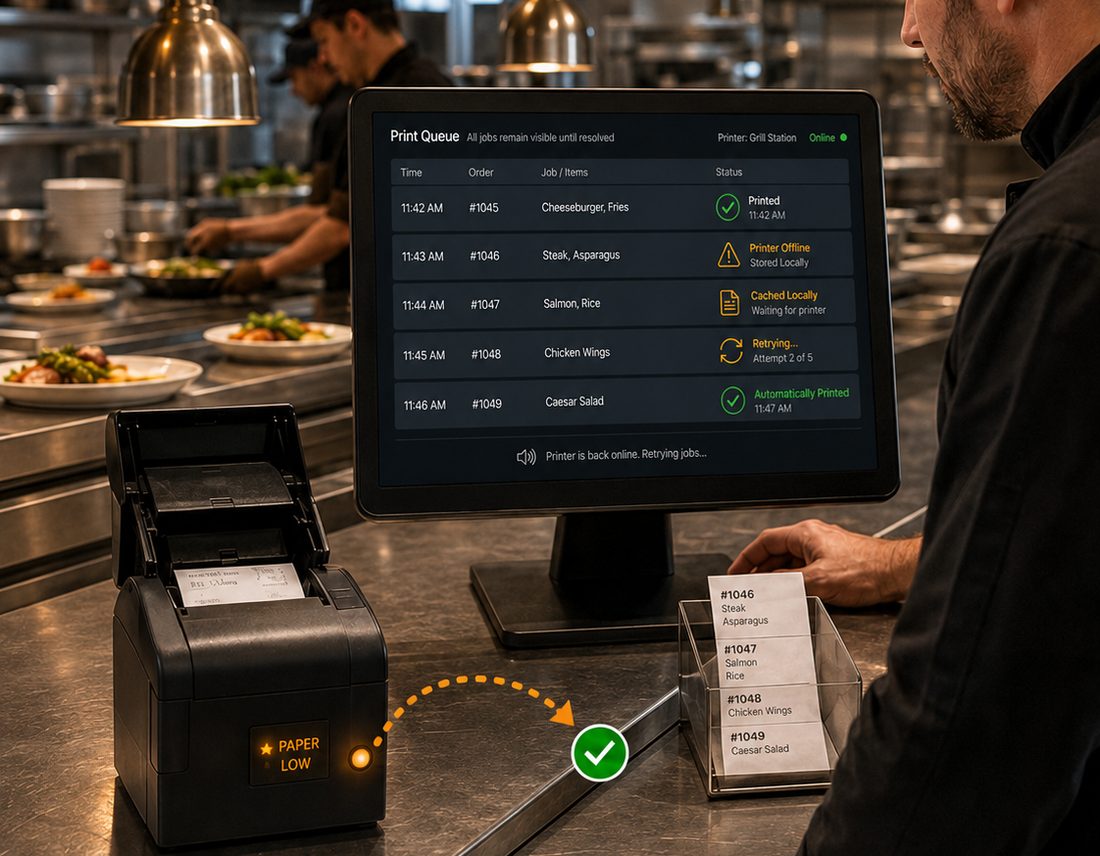
Losing a ticket is not an option. Our “Persistent Queue” technology caches every print job locally. If a printer goes offline or paper runs out, the job stays in the queue and automatically resyncs the moment the hardware is ready.
Jobs stay on the terminal if the cloud goes dark.
Visual and audio alerts for any failed kitchen ticket.
Receipts, kitchen tickets, customer-facing labels and void prints are all routed through one unified print configuration. That covers receipt printers at the counter, kitchen KOT printers, remote print stations, the print queue and reprints, so you set your printers up once rather than per device.
The routing engine sends each item to the station that cooks it — appetizers to the pantry, steaks to the grill — so chefs see exactly what they need. Stations such as Grill for hot mains and sides and Pantry for salads and desserts can each have their own printer, and every ticket confirms the station it was routed to.
Yes. Receipts are formatted for clarity and can carry your own logo, a loyalty QR code and a detailed order breakdown. Headers and footers are customizable for social links, return policies or seasonal messages, and multi-currency support is available with automatic local currency formatting for international operations.
No hardware hubs are required. The Windows Print Service turns any networked terminal into a high-speed printing gateway, and a service heartbeat keeps the gateway in sync. When configured across several sites, connection status shows how many print stations are online and which locations they belong to.
The real-time print queue tracks every job from order placement to the printer tray, listing its job ID, order reference, target printer, time and status — printed, queued, retrying or failed — alongside daily totals for jobs printed and jobs failed. The printer health monitor sits next to it, showing each printer as online or offline with its paper level, plus restart and diagnose actions when something needs attention.
Failed jobs stay visible until they are resolved. Persistent Queue caches every print job locally, so if a printer drops offline or paper runs out the job stays in the queue and automatically resyncs the moment the hardware is ready. Jobs remain on the terminal even if the cloud goes dark, and visual and audio alerts flag any failed kitchen ticket to staff.

See how Vertex routes receipts, kitchen tickets and labels to the right printer, and keeps every job in the queue until it actually prints.