
Live sync with DoorDash, Uber Eats, Grubhub.
Manage every online delivery order from one dashboard, with menu synchronisation, order updates and kitchen routing across your connected marketplaces.
Manage Every Delivery Order from One Screen
Eliminate tablet clutter. Consolidate orders from every aggregator into a single, high-throughput workspace.
Live Orders
| Source | Customer | Items | Status | Driver | Time |
|---|---|---|---|---|---|
| Zomato | Arjun Sharma | 2x Paneer Tikka, 1x Naan | Preparing | Searching… | 08:45 |
| Swiggy | Priya Verma | 1x Chicken Biryani (Large) | Ready | Rahul K. (2 mins) | 14:20 |
| Uber Eats | John Doe | 3x Burger, 1x Coke | Dispatched | On the way | 22:15 |
Sample figures shown for illustration. Marketplace availability varies by region.
Menu Sync Center
- Connected
Zomato
Last update: 2 mins ago
- Connected
Swiggy
Last update: 5 mins ago
- Synchronizing…
Uber Eats
Sync in progress
Keep Menus Updated Everywhere
One central menu for your connected platforms. Push updates, toggle availability, and change prices from a single place.
Automatic Price Updates
Push surge pricing or discounts across connected platforms from one place.
Out-of-Stock Sync
Mark an item unavailable once, and the update is pushed to every connected marketplace.
Scheduled Changes
Set breakfast-to-lunch menu transitions to switch over on a schedule.
Sample figures shown for illustration. Sync timing depends on each marketplace's API accepting the update; availability varies by region.
Seamless Lifecycle Integration
Follow an order end to end — from the marketplace to your kitchen and out for delivery.
- Step 1 of 5: CUSTOMER. A diner places an order on a delivery marketplace.
- Step 2 of 5: PLATFORM. The marketplace sends the order over its integration API.
- Step 3 of 5: SYNC HUB. Vertex normalises the order and matches it to your synced menu.
- Step 4 of 5: POS / KDS. The order is injected into your POS and kitchen display.
- Step 5 of 5: DELIVERY. A courier collects the order and completes the drop-off.
Track Every Order in Real Time
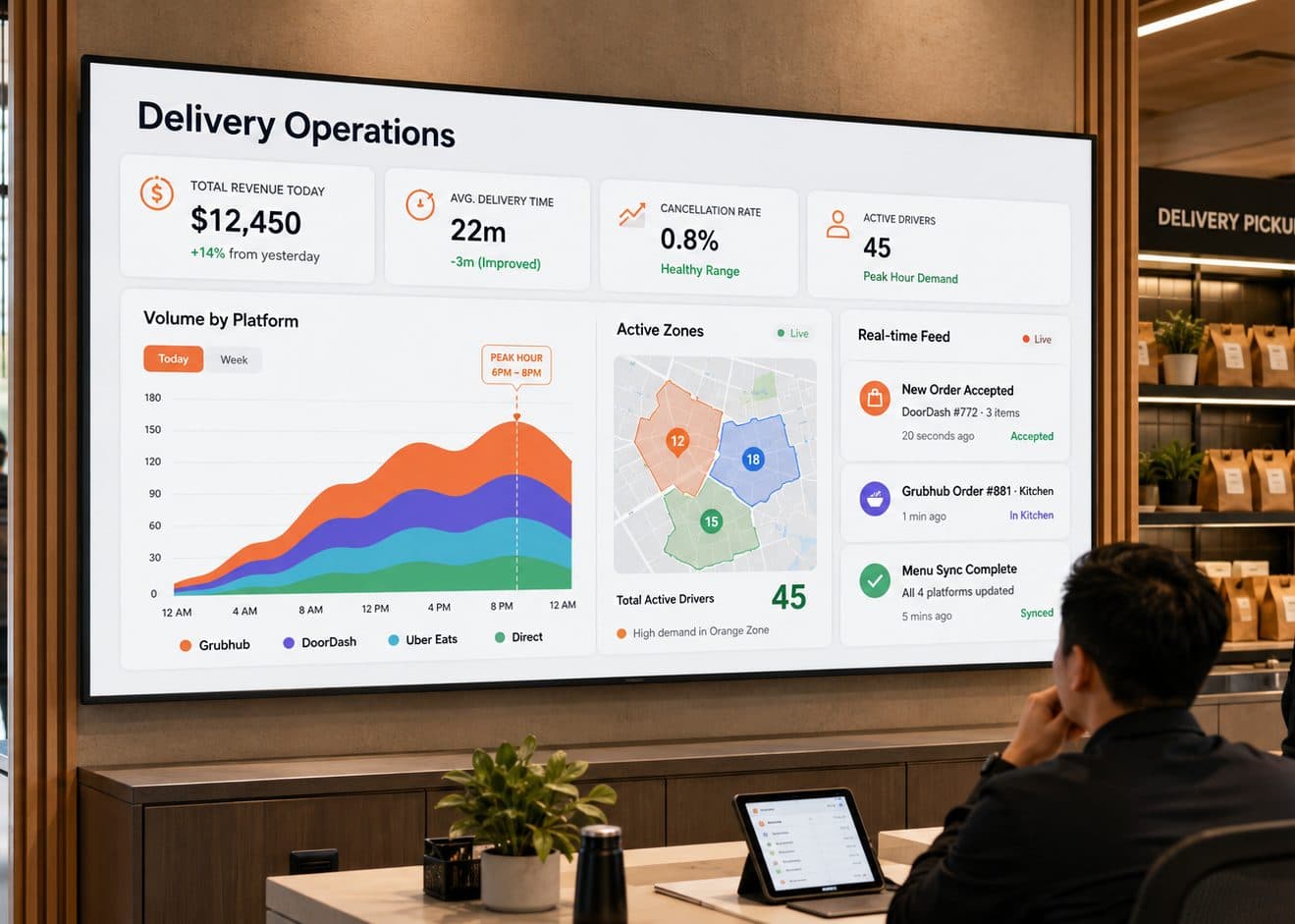
Data-driven insights to optimize your high-velocity kitchen.
Frequently Asked Questions
The honest answer is: ask sales for the current list, in writing, for the countries you operate in — and here is why that is the honest answer rather than a dodge. The screens on this page show Zomato, Swiggy and Uber Eats as example rows in a Live Orders table, and they are there to show you the shape of a consolidated dashboard, not to promise a fixed roster of integrations. Which marketplaces can be connected is decided per partner and per region: an aggregator that is available in one market may not operate in yours, may expose a different set of order and menu endpoints, or may require you to hold a particular kind of account with them before anything can be linked. That mix also changes over time as marketplaces launch, retire or rework their partner programmes. So we are deliberately not printing a badge wall here and calling it a guarantee. What the page does claim is the workspace itself — orders from the marketplaces you have connected arriving in one place, with the source, customer, items, status, driver and time in columns rather than spread across a row of tablets — and that claim holds regardless of which specific partners are live for you. The list of who those partners are is a question with a real, current answer, and the people who can give it to you accurately are sales, because they can check it against your region and your existing marketplace accounts on the day you ask.
This is the right question to ask of any integration, and the answer depends on the marketplace far more than on Vertex, so we will be plain about it. Order injection — a new marketplace order appearing in your Live Orders view instead of on that marketplace's own tablet — runs over each marketplace's API. That connection is a live dependency on someone else's system, and someone else's system can go down for maintenance, rate-limit a busy service, change without notice, or briefly reject traffic. When that happens, an order can be delayed reaching the dashboard, and the courier and customer experience for that order is governed by the marketplace, not by us. The design's header pill reads "Systems Normal" and "12 Active", and those are exactly the kind of status indicators worth watching: treat them as Vertex telling you what it can currently see, not as a promise that every connected marketplace is healthy at that instant. Practically, this means two things. First, keep whatever fallback the marketplace itself provides — its own tablet or merchant portal — reachable during your first weeks, because a consolidated dashboard is only as complete as the connections feeding it, and you want a way to catch an order if a feed stalls. Second, when you are scoping this, ask sales specifically what Vertex does when a marketplace connection drops or an order fails to inject — whether and how it surfaces that, and what it does not do — and get that answer in writing. This page shows a clean, busy dashboard; it does not state retry behaviour, alerting rules or any uptime commitment, and we are not going to invent them for you.
No, and the distinction matters enough to spell out. A last-sync timestamp — the "2 mins ago" or "5 mins ago" on the Menu Sync Center rows — tells you when Vertex last successfully pushed to that marketplace and heard back. It is a record of the last handshake. It is not a live readout that your menu, your prices and your out-of-stock marks are currently identical on every platform, because a push travels one way into each marketplace's own system, and what that system does with it — how quickly it applies, whether it accepts every field, whether the marketplace itself later edits or overrides something on its end — is outside Vertex's control. The design's promise that you can "push updates, toggle availability, and change prices in 60 seconds" is about how fast you can make the change here, from one central menu, instead of editing the same item in three separate apps; it is not a claim that the change is guaranteed to be live on every marketplace 60 seconds later. Price parity — the same item costing the same across channels — is therefore something you maintain and check, not something the tool silently keeps perfect on your behalf. Use the last-update times and the row states (one row in the render is mid-"Synchronizing…") as your signal that a push is in flight or recently landed, and if an important price or availability change has to be verified on a specific marketplace, glance at that marketplace directly rather than trusting the timestamp to mean parity.
When you 86 an item — mark it unavailable because the kitchen has run out — the Out-of-Stock Sync feature is meant to carry that mark out to your connected marketplaces from one place, so you are not hunting through each app to hide the same dish while tickets pile up. That is a genuinely useful thing, and it is the point of a central menu. But because that mark is delivered over each marketplace's API, the same honesty from the earlier answers applies: a marketplace can be slow to apply the change, can reject or rate-limit the push during a rush, or can be briefly unreachable, and in that window a guest could still see and order the item on that channel. So think of 86ing here as "tell every platform at once, from one button" rather than "the item is now impossible to order anywhere." On a busy service, if you have just 86'd something you truly cannot make, it is worth confirming it disappeared on your highest-volume marketplace instead of assuming — that is not a knock on the feature, it is just the reality of pushing into systems you do not run. The related "Scheduled Changes" idea on this page (a breakfast-to-lunch menu switching over at a set time) works the same way and carries the same dependency: it is your schedule, executed through each marketplace's API, and a marketplace having a bad moment at 11am is still a marketplace having a bad moment. Nothing here removes the value of a quick, central toggle — it just means the toggle is a request to each platform, and a request is not the same as a certainty.
That is what the lifecycle diagram on this page describes: a marketplace order moves from the customer, through the aggregator, into Vertex, and on to your POS and kitchen display, with the courier hand-off at the end. The intent is that a connected delivery order flows into the same kitchen workflow as the rest of your business rather than living on a separate screen — an accepted marketplace order becoming a ticket your line already knows how to work. A few honest caveats keep that from being oversold. The step labelled POS/KDS on the timeline is generic on purpose: this page names no printer brand, no kitchen-display hardware and no specific POS, and neither will we — what actually appears on your line depends on the setup you run, and the right person to confirm your exact hardware and configuration is sales, against your kit. The hand-off to the marketplace's courier at the end of the timeline is the marketplace's process; Vertex passing a status along is not the same as Vertex controlling the driver, the dispatch or the delivery itself. And the flow only carries the orders from marketplaces you have actually connected — an aggregator you have not linked does not appear in it. Read the diagram as the shape of the journey the page is claiming, with the kitchen and courier ends belonging to your equipment and to the marketplace respectively.
No, and we want to be careful here because this is exactly where delivery tools tend to overclaim. The Delivery Operations dashboard on this page is a reporting view: it puts figures from your connected marketplaces side by side — a revenue tile, an average delivery time, a cancellation rate, active drivers, a volume-by-platform chart — so you can compare channels in one place instead of logging into each marketplace's own reports. Every number shown, including the $12,450, the +14%, the 22-minute average and the 0.8% cancellation rate, is sample data illustrating the layout; none of it is a projection of your results, a benchmark, or a target Vertex will hit for you. On commission specifically: the commission a marketplace charges is set by that marketplace, not by Vertex. This tool can show you what those charges came to alongside your sales, which is useful for seeing the true cost of each channel, but seeing a cost is not reducing it — Vertex does not negotiate, lower or waive any marketplace's commission, and nothing on this page says it does. It also cannot promise you more orders, a higher marketplace ranking or more revenue: how many orders you receive and where you sit in a marketplace's app depend on that marketplace's algorithm, your own menu and pricing, and your market, all of which sit outside this software. What consolidated reporting can honestly offer is a clearer picture to make your own decisions from — which channel is actually worth its commission, where cancellations cluster, when your peak really is. What you do with that picture, and the results that follow, are yours.

Ready to simplify delivery operations?
Bring the marketplaces you already run onto one screen. Tell us which aggregators you work with and how your kitchen handles their orders, and we will walk you through what Vertex could consolidate — the order dashboard, one central menu, and reporting across channels — and what would still depend on each marketplace, before you commit to anything.