

Separate order and pickup lane management.
Manage multiple drive-through lanes with synchronised ordering, kitchen preparation, payment processing and pickup tracking.
Optimize Every Vehicle Journey
Customer Arrives
Vehicles join the lane queue on arrival.
Order Lane
Orders are taken at the order point and confirmed.
Kitchen Prep
Confirmed tickets route to the kitchen display.
Payment
Payment at the pickup window, contactless where supported.
Complete
The order closes and the vehicle clears the lane.
Order Lane Management
Dedicated order screens, voice support and quick item selection help keep the queue moving between the order point and the pickup window.
- Intelligent Voice-to-Text
- Dynamic Upselling Prompts
- Vehicle Color/Model ID
Vehicle colour and model recognition is an optional feature you choose to switch on and configure. You decide what is captured and how long it is kept, and you remain responsible for the privacy rules that apply where you operate.
Kitchen Synchronization
Bi-directional order flow between ordering stations and KDS displays keeps the lane and the kitchen working from the same order.
Sample order tiles: order number 1024 is cooking, and order number 1025 is in queue. Sample figures shown for illustration.
Sample figures shown for illustration.
Multi-Lane Support
Lane assignment, automatic queue balancing, and overflow handling for triple-lane configurations.
Pickup Lane Performance
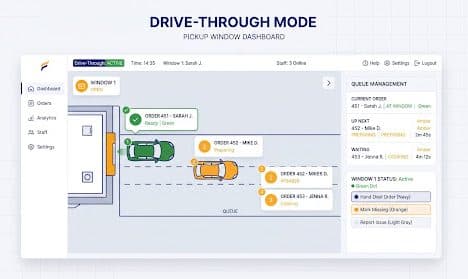
Track vehicles at the window. Ready notifications trigger as cars approach the final stop.
- Queue Depth
- 4 Cars
- Idle Time
- 0s
Sample figures shown for illustration.
Intelligence in Every Lane
Operational metrics that update as each lane event is recorded, so managers can see what the queue is doing during service rather than after it.
Monitoring active· updates on each lane event
Vehicles waiting
12 vehicles across 3 lanes, 4 per lane
+2 above the 10-vehicle average for this hour over the past 7 days
3 lanes × 4 cars per lane
Average service time
3m 24s from order point to pickup window
−12s against the same hour last week (3m 36s)
Order point to pickup window
Orders in progress
08 orders
8 of the 12 vehicles on site have an order with the kitchen
Remaining 4 are still ahead of the order point
Modelled lane ceiling
52 vehicles per hour
3 lanes at one vehicle per 3m 24s. A modelled upper bound, not a measured or guaranteed rate.
Performance Analytics
Break the trading day down by hour, by lane and by team member. Forecasts built from your own history give you a starting point for tomorrow’s staffing rota, which you adjust with what you know about the site.
Explore full analytics| Hour | Vehicles served |
|---|---|
| 11:00 | 20 |
| 12:00 | 33 |
| 13:00 | 23 |
| 14:00 | 43 |
| 15:00 | 30 |
| 16:00 | 48 |
| 17:00 | 35 |
Sample figures shown for illustration. Throughput and service times depend on your site layout, staffing and kitchen.
Frequently Asked Questions
The five stages the workflow strip on this page names, plus the screens that sit around them. A vehicle joins the lane queue; an order is taken at the order point and confirmed; the confirmed ticket routes to the kitchen display; payment is taken at the window; the order closes and the car clears the lane. Around that sit lane assignment and queue balancing for sites running more than one lane, a pickup-window dashboard listing the cars at the window with their ticket numbers and states — the comp shows tickets marked ready, preparing and waiting — and a manager view reporting queue depth, service time, lane utilisation and throughput by hour. Two framings before any of the detail, because they govern every answer below. The first is that every number printed on this page is sample data drawn to show the shape of a screen: the twelve vehicles waiting, the three-minute-twenty-four average service time, the 142 vehicles per hour, the four-car queue depth, the 84% lane capacity, the 0s idle time, the ticket numbers and the customer names beside them. None of it was measured at a real site, none of it is a projection of your results, and none of it is a target being recommended to you. Please do not build a business case on a figure that exists to make a mock dashboard look populated. The second framing is the honest scope of the module: a drive-through is a physical operation and Vertex is the software layer over it. It coordinates what the lane, the kitchen and the window each know, and it records what happened so you can look at it afterwards. The tarmac, the queue length, the hardware in the ground, the kitchen capacity and the people on shift are yours, and between them they set what is actually possible on your site. Several of the answers below are really about keeping that line visible, because this page's design language — automated, intelligent, real-time, zero lag — tends to blur it.
Those are the design's words, quoted here rather than restated, and this is the answer on the page to confirm with our sales team before you decide anything on the strength of it. You will not find an accuracy figure, a list of supported languages, a claim about accents or dialects, a noise-performance number or the name of a speech technology anywhere in this answer, because this page states none of them and inventing one would be worse than saying nothing. Those are precisely the questions worth putting to sales in writing, phrased for your own sites, your own menu and the languages your customers actually order in — and worth asking to trial in a real lane at a real lunchtime rather than seeing demonstrated in a quiet room. What can be said honestly is the shape of the problem. A drive-through order point is one of the least forgiving acoustic environments in hospitality: the customer is speaking from inside a metal box, the microphone lives outdoors in whatever weather you get, the engine is running, the stereo may be on, a passenger talks over the driver, a child answers from the back, and the person ordering is often reading a board they can only half see while watching the car in front. Transcription in that setting produces text that has to be checked before anyone cooks from it. So plan for the arrangement that actually works, which is a person backing it up: the order visible on screen, read back to the customer and confirmed before it reaches the kitchen, and a member of staff able to take over the conversation the moment it goes sideways — which it will, on the order with three modifications and an allergy question. Treat any speech feature as something that drafts an order and treat your team as the ones who own it. In particular, do not make it a staffing assumption until you have run it in your own lane through your own busiest hour and looked at what came out. The same reading applies to the “Dynamic Upselling Prompts” listed beside it: a prompt is a suggestion shown to whoever is on the headset, for a person to use or ignore, and what it suggests is configuration you control. It is not a system talking to your customer, and how it lands is a training question rather than a software one.
The workflow strip calls this “Automated arrival detection” and then stops — the page names no sensor, no supplier and no installation — so we are not going to invent one for it. Detecting that a car has reached a particular point in a lane is a hardware problem before it is a software problem, and in this trade it is normally solved with something physical in or beside the tarmac. Induction loops cut into the surface, infrared or ultrasonic presence sensors on a post, a camera watching the approach, and beacons at the order point are all approaches that exist. Each is a different capital cost, a different installation job, a different maintenance story, and in the camera case a different legal question — see the vehicle-identification answer below, because that distinction matters more than it first appears. Which of these Vertex works with, whether any detection hardware is supplied as part of the product or sourced separately, whether a loop or lane-timer system already installed on your site can feed it, and what integration work that would involve are questions for our sales and implementation team. Get them answered in writing before anyone quotes you for digging up a lane, because the answer changes the cost of the project by an order of magnitude. It is also worth asking the less obvious question, which is what happens on a site with no detection hardware at all — and there will be such sites, at least at first. On many drive-through setups the practical arrival event is simply a member of staff or an order-taker opening the ticket, and a system that can run that way is a system you can deploy on day one while the hardware conversation goes on separately. Ask specifically whether that fallback exists and whether the reporting still works without sensors, because if service-time measurement depends on an automatic arrival timestamp, a site without one measures nothing. The honest summary: Vertex can act on an arrival event. Where that event comes from on your forecourt is a scoping conversation this page has not had with you.
Two parts, and the second matters considerably more than the first. What it is for is mundane and genuinely useful. At a window with several cars stacked, where orders come out of a kitchen in a different sequence to the one they went in, a note reading silver hatchback attached to a ticket is a faster and far less awkward way for a member of staff to match a bag to a car than reading a name back through a half-open window in the rain. Where it turns serious is what the feature is doing when a camera is involved, and that is the version worth thinking hard about. A vehicle is not an anonymous object. It is associated with a person, it turns up at the same place at the same time of day, and in many jurisdictions data captured about a vehicle by a camera — its appearance, its registration, the timestamped fact that it was at your premises — is treated as personal data, occasionally as a category attracting extra protection, with real obligations attached: telling people it is happening before they enter, having a lawful basis for doing it at all, keeping only what you need for only as long as you need it, securing it properly, and being able to answer a request from the person it concerns. Some jurisdictions additionally regulate the cameras themselves, or require notice at the entrance in a particular form and place. You will not find a retention period, a named statute, a signage wording or a threshold stated in this answer, because those differ between countries and often between cities, and they change. The honest framing is therefore a division of responsibility rather than any kind of reassurance. This is a capability an operator chooses to switch on and configure, and the operator is the party responsible for how it is deployed: what gets captured, whether it is captured by camera at all or simply typed by a colleague, what the sign at the lane entrance says, how long the record is kept, who inside the business can see it, and what happens to it afterwards. Running Vertex does not make your business compliant with data-protection or surveillance law, and we would ask you not to read this page — or its confident little checkmark — as saying otherwise. Before you turn anything camera-based on, take your specific plan and your specific jurisdictions to your own data-protection adviser or legal counsel; if you are required to complete an impact assessment before deploying that kind of processing, this is the sort of processing that tends to require one, and it is much cheaper to do beforehand. Then put the product-side questions to sales in writing: what exactly is captured, whether an image is stored or only a short text description, where it is stored and for how long, what retention and deletion controls you get, who can export it, and whether the feature can be run entirely from staff-entered descriptions with no camera in the loop. That last option is worth noting on its own, because the plainest and lowest-risk version of this feature is a colleague typing blue estate into the ticket, and it is available to you regardless of what else you decide.
Those are sample figures on a mock dashboard and we are not going to stand behind them as an outcome you should expect. No software promise about drive-through speed survives contact with a real site, because the things that set your service time are almost entirely physical. How long your lane is and how many cars can stack in it before the queue spills onto the public road. Whether you have one order point or two. Whether payment and collection share a window or are split across two. How far the order point sits from the kitchen. How complex your menu is and how much of it is genuinely made to order rather than held. How much kitchen capacity you have at ten past twelve. How many people are rostered, how well trained they are on a bad shift, and whether the person on the headset is also the person on the fryer. The weather. Vertex changes none of that, and a page that implies otherwise is selling you something it cannot deliver. What the software can honestly offer is coordination and measurement. The order that was taken is the order the kitchen sees, so the ticket does not get re-keyed or mis-heard between the lane and the pass. The window knows which car is next and what state its food is in. In a multi-lane site, a car can be assigned to a lane deliberately rather than by whoever shouts first. And the times you actually run — by hour, by lane, by day of the week — get recorded rather than remembered, which is the quiet part and the genuinely valuable one. A site that can see its own service time by hour can discover that the queue backs up at twenty to one because the second window goes unstaffed over the changeover, and fixing that is a rota decision a manager makes. The software found the pattern; the improvement came from a person. So: no promise here of faster service, more vehicles per hour, a shorter queue, or a saving of any amount. Two of the sample numbers deserve a flag of their own. An idle time of 0s is a figure on a demo screen and not an operational state to aim for — real lanes have gaps, and a lane running with no slack at all has nothing left to absorb the order that takes four minutes. And the “-12s optimized” caption under the service time is a decorative comparison against a baseline that does not exist. Measure your own baseline before you change anything, over enough weeks to see your own seasonality, and judge any change against that rather than against a number drawn in a design file.
The design describes “real-time bi-directional flow between ordering stations and KDS displays” and then claims it “ensures zero lag in preparation”. The first half is a fair description of something real; treat the second half with the scepticism it has earned. What is genuinely being described is that the order point and the kitchen are looking at the same ticket rather than at a printed slip and a shout across a pass: an order confirmed at the lane appears on the kitchen display carrying a state — the comp shows one ticket cooking and one queued behind it — and when the kitchen marks it up, the window sees that it is ready without anyone asking. The pickup dashboard is the other end of the same object: the cars at the window in sequence, each with its ticket and its state, and the actions a member of staff can take on them, which in the mock are handing the order over, marking an item missing and raising an issue. Multi-lane support sits on top of that — orders are assigned to a lane, the queue can be balanced across the lanes you have, and the design mentions overflow handling for triple-lane configurations. Worth being clear that lane balancing is a rule you configure and a person can override; it does not know that the second lane's headset died this morning unless somebody tells it, and the override needs to be as easy to reach as the automation. On “zero lag”: there is no such thing across a network. Screens update quickly when the connection is healthy, and the latency you are actually exposed to is your own site's — an access point at the far end of a car park, a switch in a hot cupboard, a display that has been powered on continuously since the site opened. That is worth engineering properly at installation rather than discovering at a lunch rush, because this entire module depends on it. Which brings us to the least glamorous and most important point. A drive-through built on synchronised screens has hard physical dependencies, and it is worth listing them plainly: mains power at the order point and at the window, a network that reliably reaches both, headsets that work, a card reader at the window your acquirer is happy with, and — the one people forget until the first Saturday — lane geometry and a car park that let vehicles stack somewhere other than the public road. Software cannot help you with any of those. So ask sales the specific resilience question in writing before you sign: what happens when connectivity drops mid-service, whether the terminal at the window keeps taking orders and payments offline, what reconciles when the link comes back and how conflicts are resolved, and what the kitchen sees in the meantime. Get the answer in writing, and keep a paper fallback your team has actually rehearsed, because the hour you find out is the hour you can least afford to.
Ready to run the lane and the window on one system?
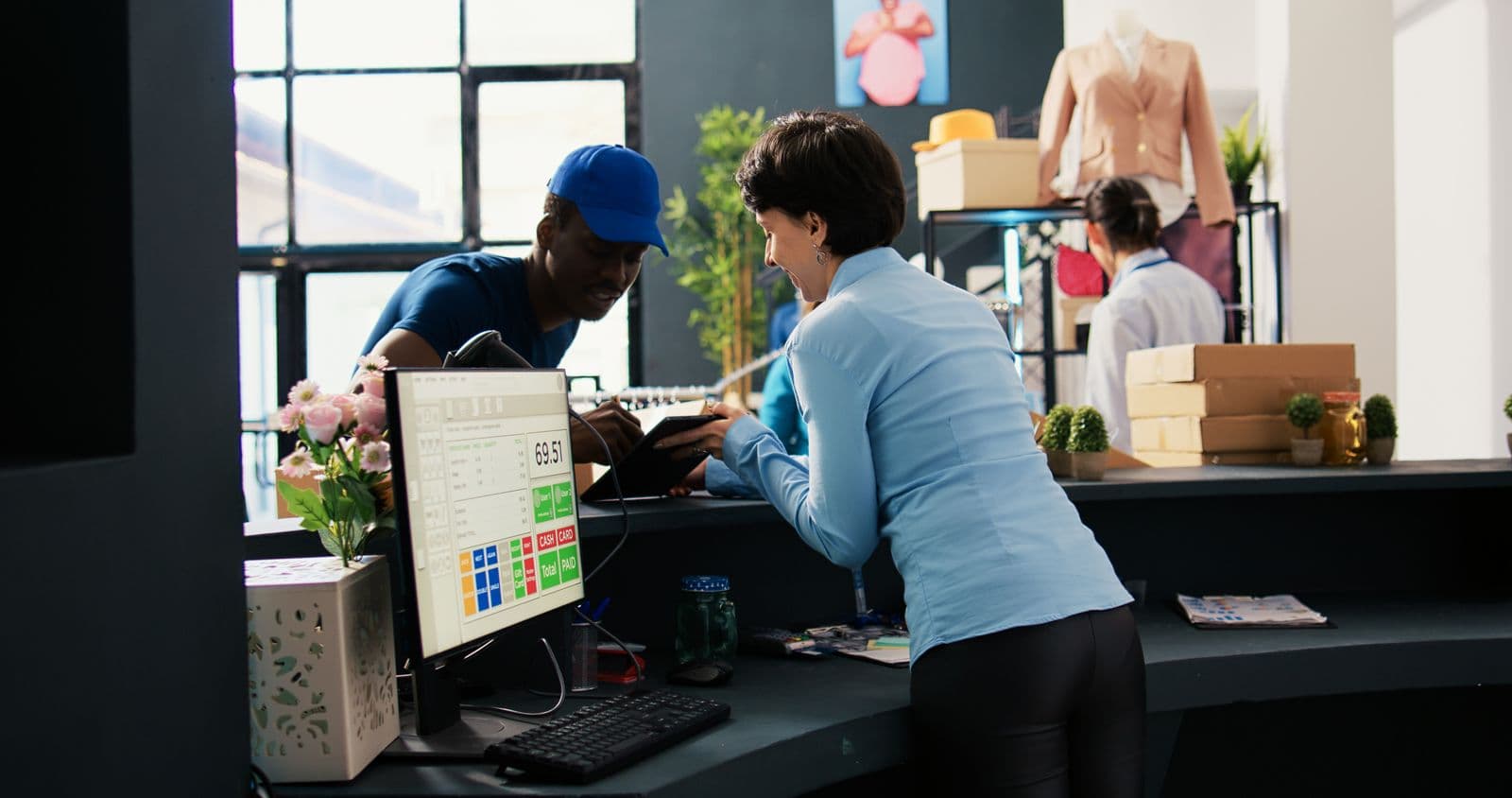
Tell us how your drive-through really runs — how many lanes you have, where the order point sits, whether payment and collection share a window, what the kitchen is carrying at midday, and what is already installed in the tarmac — and we will walk you through what Vertex would coordinate and record, and what would still sit with your site and your team, before you commit to anything.